
Browse the Manifest help
Bundles: build a box and complete the set
Let shoppers pick their own box of products, or add everything that goes with a product in one tap.

Bundle builder
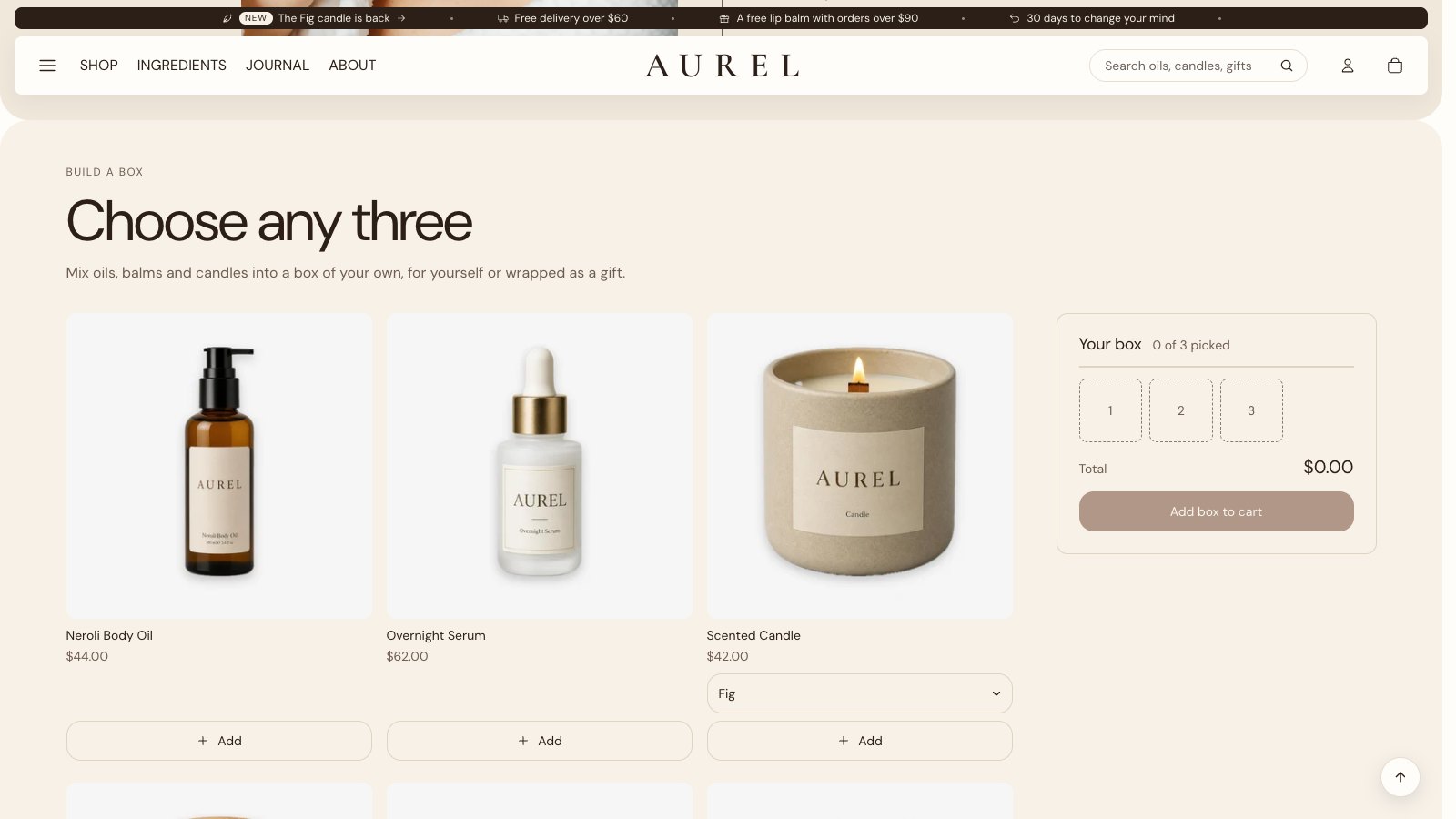
The Bundle builder section shows products from a collection you choose. Shoppers add the ones they want, in any option, into a box of the size you set (2 to 8). The box fills slot by slot beside the products (at the bottom of the screen on phones), shows the real total, and adds everything to the cart in one go once it's full.
- Add the Bundle builder section, choose the collection to pick from and set the Box size.
- Choose Columns on large screens. Automatic fills the rows evenly: 6 products show as 3 and 3, 8 as 4 and 4, and 7 as 4 and 3, never 5 and 1. Or choose 3 or 4 to set it yourself.
- To give a saving, create an automatic discount in Shopify, such as 10% off when buying 3 or more from that collection.
- Write the offer in Offer, such as Pick any 3 and save 10%. It shows in the box; the saving itself appears in the cart, from your discount.
Complete the set
The Complete the set block on the product page lists the products that go with this one, each with a checkbox, and adds them all with the product in one tap. It uses the complementary products you set in the free Search and Discovery app, and stays hidden for products with none. For a single suggestion, the Buy both block does the same with one product.