AI chatbot and shared inbox for WhatsAppMeet your AI Agent
It answers your customers on WhatsApp, Instagram, Messenger, your website and email from your own information, books them in, and brings your team in the moment it should.
 Messenger
- WhatsAppYour own business number
- InstagramDMs from your profile
- Facebook MessengerMessages to your Page
- Website chatA widget or a hosted chat page
- EmailA shared mailbox, tickets
Answers, books and hands over.
Day and night, in your words.
Answers from your information, not the internet
Give it your services, prices, hours and policies, and the pages and files you want it to know. It answers in your tone and shows where the answer came from.
- Website pages, PDFs, Q&A, Notion, Google Docs and your Shopify catalogue
- Says so when it doesn't know, instead of guessing
- Try it in the playground before a customer does
 InstagramAI Agent on
Books the slot while you're with a client
It offers your real free times as buttons, takes the booking into your calendar and sends the reminder, at 11 pm as well as 11 am.
- Services, staff, rooms, tables and classes with seats
- Free times as tap-to-choose buttons
- WhatsApp reminders before the visit, if you switch them on
 WhatsAppAI Agent on
Brings your team in when it should
A complaint, a refund, something it doesn't know: it tells the customer, assigns the right person and hands over the whole conversation.
- Your rules for what it never handles
- Take over with one click; it stays quiet until you hand back
- Every automated reply marked in the inbox
 Website chatAI Agent on
One agent on every channel, in their language
The same agent answers on WhatsApp, Instagram, Messenger, your website and email, in the language the customer writes in.
- Your own WhatsApp number, connected through Meta
- Replies in the customer's language
- All of it in one inbox for your team
WhatsAppAI Agent onOne agent for them.
One inbox for you.
Every channel lands in one list, with the ones waiting for a person at the top. Open a conversation and you see the customer, their past bookings and everything said, on any channel.
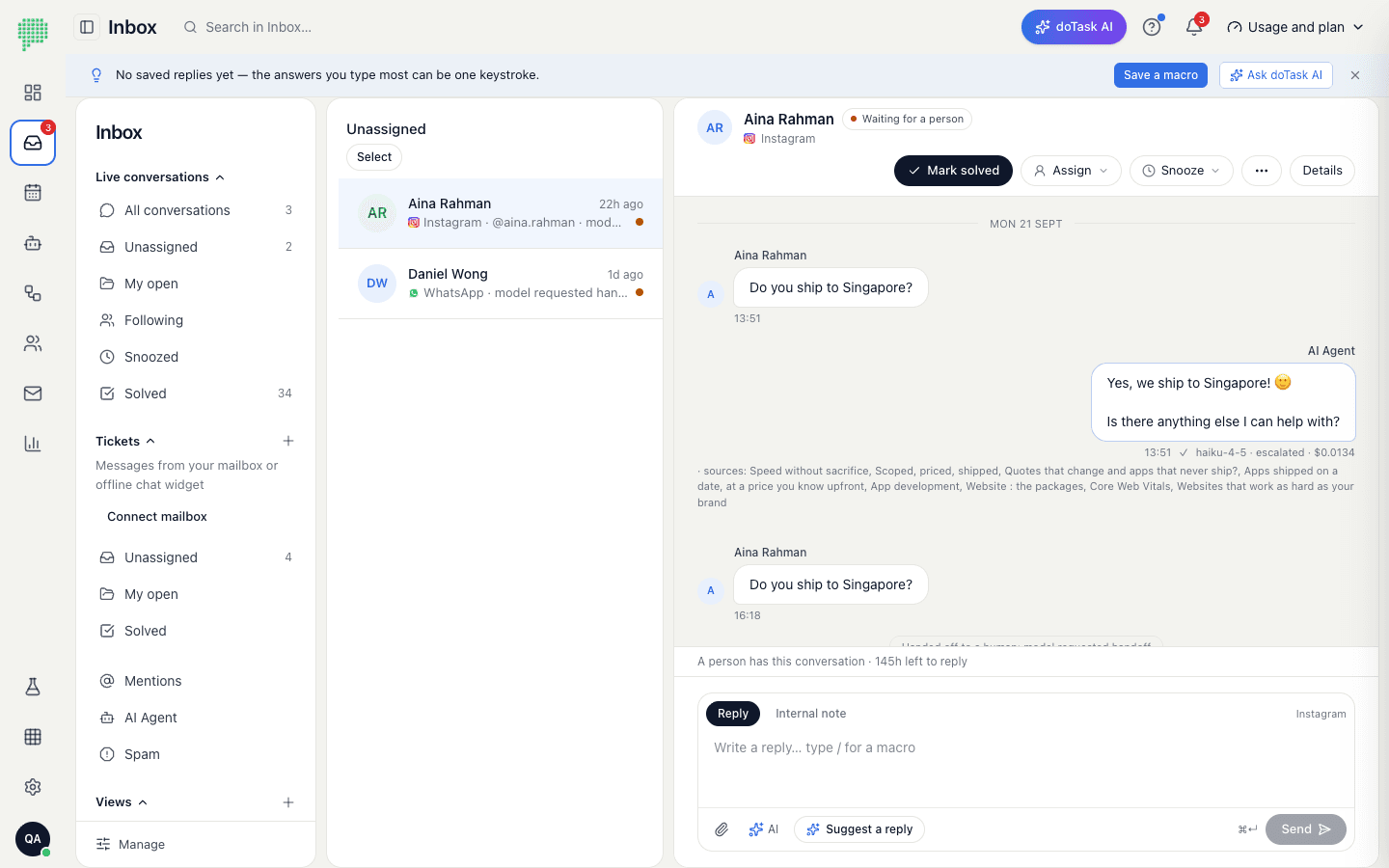
- Assign and followGive a conversation to a teammate, follow it, snooze it, or leave a note with an @mention.
- Saved repliesShortcuts for the answers you give every day, and translation both ways.
- LiveNew messages appear as they arrive, with sent, delivered and read ticks.
An agent you can trust
with your customers
Shows its work
Every reply shows the sources it read and the tools it used, and what it cost.
Learns from your team
Answers your team writes become suggestions for its knowledge, and the questions it couldn't answer become a list.
Speaks their language
It replies in the customer's language, day and night, on every channel at once.
For any business that
gets messages and takes bookings
Every industry Clinics and dentistsAppointment requests answered and booked around the clock; reminders before the visit.
 Professional servicesConsultants, accountants and law firms: first questions answered, consultations booked, the rest handed to a person.
 Real estateEnquiries from listings and ads captured in one inbox; viewings booked from the chat.
 Salons and barbersServices, prices and free times offered as buttons; each stylist with their own calendar.
 Fitness and studiosClasses with seat counts, personal training slots, and a WhatsApp reminder before the session.
 Restaurants and cafésTable bookings by party size on a floor plan; menu and hours questions answered instantly.
 Education and tutoringCourse questions answered from your own material; trial lessons booked without a phone call.
 Retail and e-commerceOrder and stock questions answered on web chat and Instagram; your Shopify catalogue as the source.
Live this afternoon
- 1
Connect your channels
WhatsApp through Meta's sign-in, Instagram from your profile, the widget with one line on your site.
- 2
Teach your agent
Your services, prices, hours and policies. Try it in the playground before a customer sees it.
- 3
Step in when you want
Watch the inbox, take over with one click, hand back when you're done. The agent covers the rest.
Before you ask
Do I need a new WhatsApp number?
No. You connect the WhatsApp Business number you already have through Meta's own sign-in. The number and the account stay yours; Meta bills you directly for WhatsApp conversations, and doTask never sees your Meta payment details. If the number is on the WhatsApp Business app on your phone, you can keep using the app: Meta calls this Coexistence, and doTask works beside it, with the app's contacts and the last six months of chats copied into the inbox.
What does the assistant answer from?
Only what you give it: your services, prices, opening hours, policies and the pages or documents you add. If a question is outside that, it says so and hands the conversation to your team instead of guessing. Every automated reply is marked as such in the inbox, with what it cost.
Can my staff still reply themselves?
Always. Take over any conversation with one click; the assistant goes quiet while a person is handling it and comes back when you hand it back. Replies from the inbox reach the customer on the channel they wrote on.
How does booking work?
You set up your services, the people or places that deliver them, and your hours. Customers book through the assistant in chat, on your booking page, or from a QR code; your team books from the calendar. Reminders can go out on WhatsApp before the appointment.
Where is our data kept?
Conversations are stored in Singapore, encrypted credentials with them. We do not sell message data or train AI models on it. Details are in our privacy policy. Privacy policy →
More answers: the full FAQ, what Meta charges for WhatsApp in Malaysia, installing on Shopify, integrations, plans and prices and how doTask compares.
Explore more of doTask
See it on your own number
Start free and connect a channel, or book 30 minutes and we'll set it up with you.